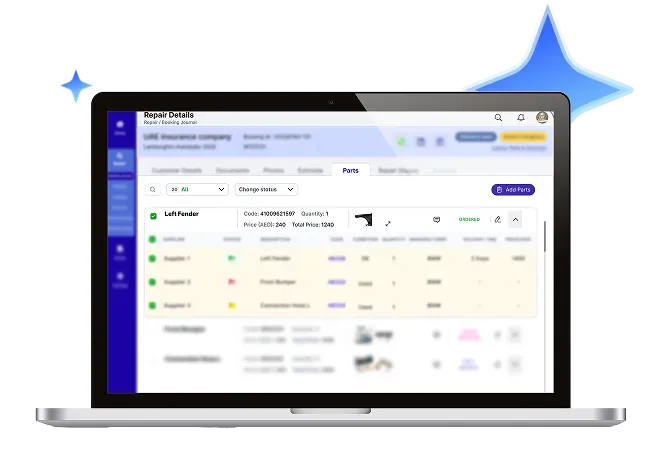
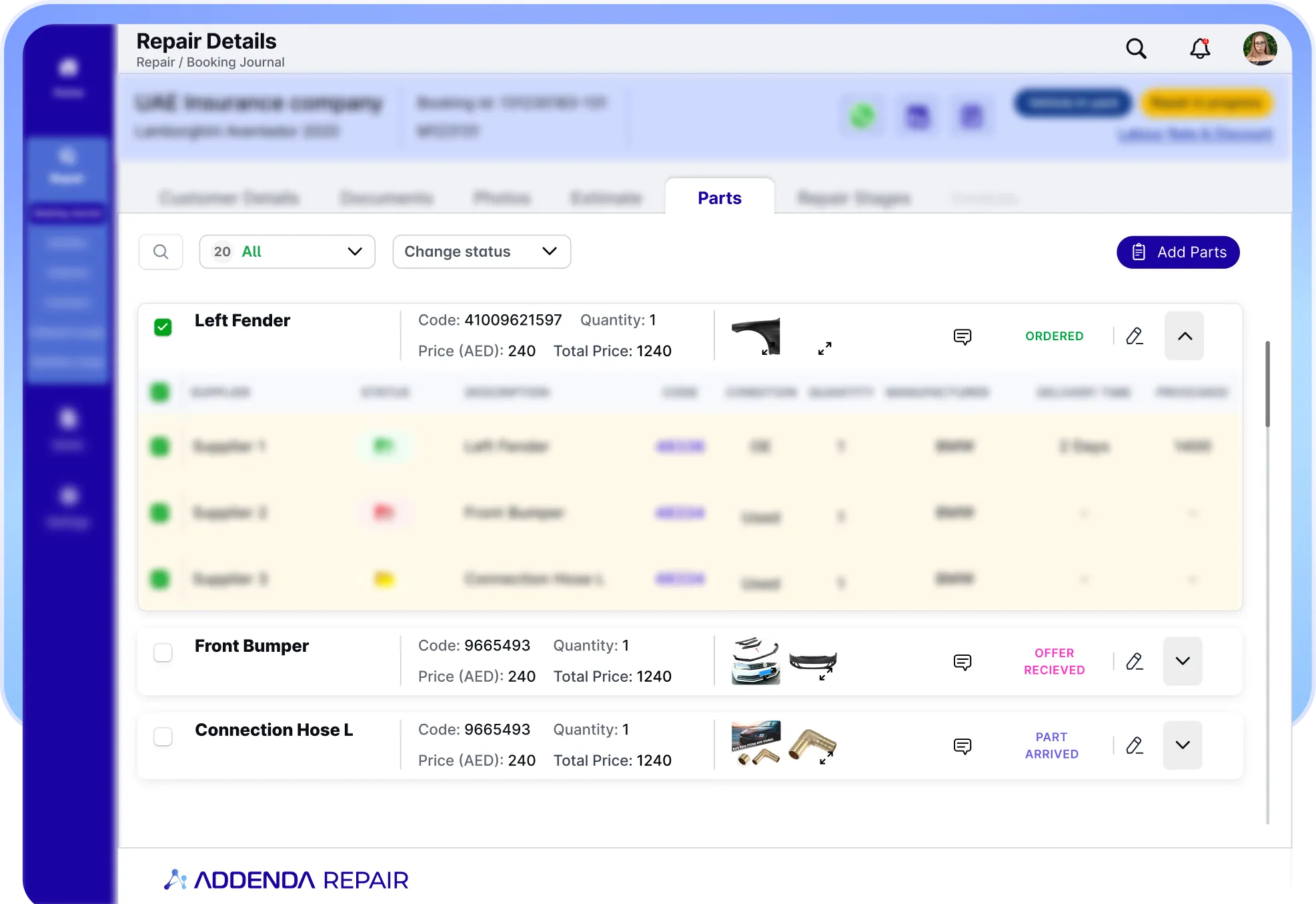
Automotive Inventory Management, Simplified

An AI-powered, modular platform built to digitize everyday workflows.

Inventory Hero
Beema Logo
BASF Logo
Liva Logo
GIG Logo
Tata Motors Logo
Microsoft logo
Beema Logo
BASF Logo
Liva Logo
Beema Logo
BASF Logo
Liva Logo
GIG Logo
Tata Motors Logo
Microsoft logo
Beema Logo
BASF Logo
Liva Logo
Blue four-pointed star icon with a glossy highlight effect.
overview
Blue four-pointed star icon with a glossy highlight effect.

Built for Automotive Workshops, Dealerships, and Parts Operations

Inventory Overview
Addenda Inventory is a configurable inventory management solution designed specifically for the automotive repair and parts sales ecosystem. It provides repair garages, quick service centers, body shops, dealers, and suppliers real-time visibility and control over parts, stock levels, procurement, and sales across single or multiple locations.
Fully integrated with Addenda Repair Orders, Procurement, and Sales workflows, the system ensures accurate stock tracking, optimized purchasing, and smooth day-to-day operations without manual reconciliation or disconnected tools.
90%
Icon of a car with a wrench, symbolizing car repair or maintenance.White lightning bolt icon on transparent background.
Productivity boost

Faster damage detection & estimates

40%
Icon of a person wearing a hard hat with a gear symbol beside them, representing an engineer or technician.White lightning bolt icon on transparent background.
Productivity boost

more efficient technician scheduling

30%
Hand holding a coin with a dollar sign above it, symbolizing saving money.
Productivity boost

Savings on parts & ordering

20%
Icon of a dollar symbol surrounded by gears with three downward arrows below it.White lightning bolt icon on transparent background.
Productivity boost

Lower operational costs

Blue four-pointed star icon with a glossy highlight effect.
Benefits
Blue four-pointed star icon with a glossy highlight effect.

Why Automotive Businesses Use Addenda Inventory

Full Control Over Parts and Suppliers
Blue four-point star shape with the number 1 in white at the center.
Full Control Over Parts and Suppliers

Manage parts, categories, suppliers, pricing, and tax rules from a centralized system. Maintain accurate records, standardize procurement decisions, and eliminate fragmented spreadsheets or disconnected tools across your workshop or dealership operations.

Reduced Shortages and Overstock

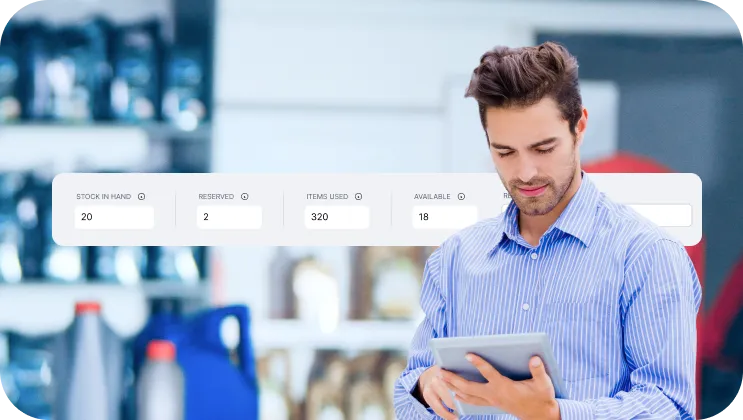
Set minimum stock thresholds to maintain optimal inventory levels. Prevent repair delays caused by missing parts while avoiding excess purchasing that ties up capital and warehouse space.

Reduced Shortages and Overstock
Blue four-pointed star icon with the number two in white at the center.
Faster Repair and Sales Execution
Blue four-pointed star with a white number three in the center.
Faster Repair and Sales Execution

Access real-time stock availability during repair orders and sales transactions. Consume or sell parts instantly with automatic stock updates, ensuring smooth workflows and minimizing operational bottlenecks.

Centralized Multi-Location Visibility

Monitor inventory across multiple warehouses or branches from a single dashboard. Gain location-level visibility while maintaining centralized control over stock movements and purchasing strategies.

Centralized Multi-Location Visibility
Blue four-point star with the number 4 in white at the center.
Seamless Integration with Daily Operations
Blue four-pointed star with white number 5 in the center.
Seamless Integration with Daily Operations

Connect inventory directly with Addenda Repair, Procurement, and Sales modules. Ensure every purchase, usage, or sale updates stock automatically without manual reconciliation or duplicate data entry.

Blue four-pointed star icon with a glossy highlight effect.
key features
Blue four-pointed star icon with a glossy highlight effect.
Blue four-point star sparkle icon.

Designed for Complete Inventory Control

Configurable Inventory Structure

Create customizable part categories, groups, suppliers, pricing rules, tax configurations, and profit margins to match your specific workshop, dealership, or parts distribution business model.
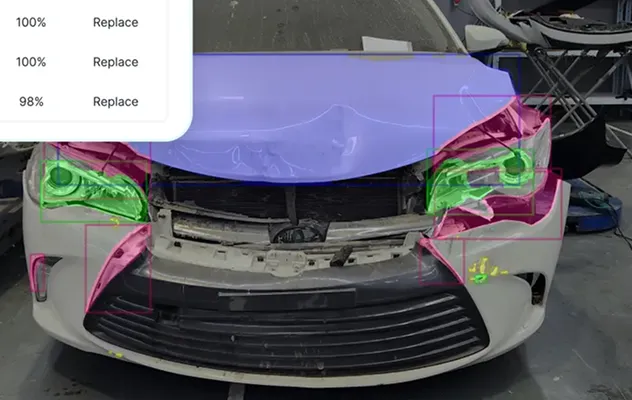
Front of a white car with visible damage and colored overlays highlighting the headlights, hood, and bumper parts.
Real-Time Stock Management

Track live stock levels with automatic updates after purchases, repairs, or sales. Maintain complete movement history and visibility into stock quantities at all times.

Front of a white car with visible damage and colored overlays highlighting the headlights, hood, and bumper parts.
Minimum and Maximum Stock Controls

Define stock thresholds to trigger low-stock alerts and support smarter purchasing decisions. Maintain optimal inventory levels while reducing emergency orders and unnecessary overstocking.

Front of a white car with visible damage and colored overlays highlighting the headlights, hood, and bumper parts.
Procurement Workflow Integration

Generate RFQs, compare supplier quotations, create purchase orders, and update stock automatically upon goods receipt, ensuring purchasing decisions directly reflect in inventory records.

Front of a white car with visible damage and colored overlays highlighting the headlights, hood, and bumper parts.
Manual and Bulk Item Creation

Add parts individually or import large item lists via Excel. Define codes, pricing, tax rules, and margins with full flexibility to support diverse inventory structures.

Front of a white car with visible damage and colored overlays highlighting the headlights, hood, and bumper parts.
Repair Order Integration

Add and consume parts directly within Addenda Repair workflows. Automatically deduct used items from inventory and verify availability in real time before confirming service jobs.

Front of a white car with visible damage and colored overlays highlighting the headlights, hood, and bumper parts.
Sales Module Integration

Sell inventory items through the Sales module with automatic stock deduction. Ensure accurate availability tracking and synchronized records across service and retail operations.

Front of a white car with visible damage and colored overlays highlighting the headlights, hood, and bumper parts.
Multi-Location Warehouse Management

Manage multiple warehouses and storage locations with per-location stock visibility. Track transfers and movements while maintaining centralized oversight across your entire network.

Front of a white car with visible damage and colored overlays highlighting the headlights, hood, and bumper parts.
Blue four-pointed star icon with a glossy highlight effect.
How we connect with system
Blue four-pointed star icon with a glossy highlight effect.

Integrates With

Black envelope icon with an email symbol on a white background.
Email
Black speech bubble icon with the text SMS inside.
SMS
WhatsApp logo in white on a black circular background.
WhatsApp
Blue four-pointed star icon with a glossy highlight effect.
Journey
Blue four-pointed star icon with a glossy highlight effect.

5 Steps to Streamlined Inventory Management

Once approved, the request is assigned to the appropriate garage, and the estimate is converted into a repair order.
White polygon shape composed of five connected lines forming an irregular pentagon on a black background.
Once approved, the request is assigned to the appropriate garage, and the estimate is converted into a repair order.
White polygon shape composed of five connected lines forming an irregular pentagon on a black background.
Once approved, the request is assigned to the appropriate garage, and the estimate is converted into a repair order.
White polygon shape composed of five connected lines forming an irregular pentagon on a black background.
Once approved, the request is assigned to the appropriate garage, and the estimate is converted into a repair order.
White polygon shape composed of five connected lines forming an irregular pentagon on a black background.
Once approved, the request is assigned to the appropriate garage, and the estimate is converted into a repair order.
White polygon shape composed of five connected lines forming an irregular pentagon on a black background.
Timeline with nine blue icons representing car maintenance steps including checklist, mobile inspection, cost estimation, customer approval, garage service, mechanic, repairs, remote diagnostics, and scheduled checkup.
Solid black triangle pointing upward on a white background.
Once approved, the request is assigned to the appropriate garage, and the estimate is converted into a repair order.
Solid black triangle pointing upward on a white background.
Once approved, the request is assigned to the appropriate garage, and the estimate is converted into a repair order.
Solid black triangle pointing upward on a white background.
Once approved, the request is assigned to the appropriate garage, and the estimate is converted into a repair order.
Solid black triangle pointing upward on a white background.
Once approved, the request is assigned to the appropriate garage, and the estimate is converted into a repair order.
Blue icon of a clipboard with car documents and a car in front of it.
Configure

Set up parts, categories, suppliers, tax rules, and pricing structures.

Smartphone with stars on screen next to a car representing taxi booking.
Add Stock

Receive inventory through procurement, manual entry, or bulk import.

Icon of a taxi car in front of a document with a dollar sign, symbolizing a taxi fare or bill.
Track

Monitor real-time stock levels across all locations and warehouses.

Blue line icons of two people, a gear representing settings, and a hand giving a thumbs-up.
Use or Sell

Consume parts through Repair Orders or sell through the Sales module with automatic stock updates.

Blue line icons of two people, a gear representing settings, and a hand giving a thumbs-up.
Optimize

Review stock movements, thresholds, and purchasing data to improve inventory performance.

Blue four-pointed star icon with a glossy highlight effect.
industries
Blue four-pointed star icon with a glossy highlight effect.

Industries Addenda Repair Serves

Icon of a car with sparkles representing exterior auto detailing services.
Car Detailing Centers
Blue gear icon connected to three small squares representing fleet management or organizational structure.
Fleet Operations
Icon of an auto parts store with a car under a wrench sign on the roof.
Spare Parts Shops
Blue tire icon with tread pattern details.
Tire Outlets
Icon of a car with a wrench symbol, representing car repair or maintenance.
Bodyshops & Accident Repair Center
Blue line icon of a smartphone with a gear on the screen representing settings or configuration.
OEM Service Centers
Icon of a tow truck with a wrench above it, symbolizing truck repair services.
Truck Repair Centers
Icon of a person selling a car from a dealership desk next to a car.
Dealerships
Icon of a car parked inside a garage with a triangular roof and circular window.
Car Service & Maintenance Shops
Blue icon of a car with a shield featuring a checkmark above it, symbolizing vehicle protection or insurance.
Insurance Companies
Blue line icon of a car with a key above it indicating car rental or car key access.
Car Rental Companies
Icon of a storefront with a striped awning above and two people standing below, symbolizing a franchise business.
Multi branch Garage Networks
Blue four-pointed star icon with a glossy highlight effect.
comparison
Blue four-pointed star icon with a glossy highlight effect.

How Addenda FNOL Compared to Traditional FNOL Processes

Traditional FNOL Addenda FNOL
Availability Dependency on operating hours and call center availability. 24/7 digital FNOL submission, accessible anytime from anywhere.
Speed Back-and-forth communication to complete required information. Guided digital flow completed in minutes with required data captured upfront.
Transparency Updates are shared manually through calls or emails. Real-time claim tracking with automated status notifications.
Data Quality Free-text entries and inconsistent information across channels. Structured, validated data capture with mandatory fields.
Fraud & Control Manual verification after submission. Time-stamped, geo-tagged uploads with image source identification.
Blue four-pointed star icon with a glossy highlight effect.
packages
Blue four-pointed star icon with a glossy highlight effect.

our selection of plans to identify the ideal choice  for your enterprise.

Lite
Blue heart-shaped icon with a rounded design.Black checkmark inside a white circle with a black border.
Single site, up to 50 transactions p/m
Black circular close button with a white 'X' in the center.
Launch time B2C
Blue heart-shaped icon with a rounded design.Black checkmark inside a white circle with a black border.
1 User license
Black circular close button with a white 'X' in the center.
Technician calendar
Black circular close button with a white 'X' in the center.
Customer application (Auto builder)
Black circular close button with a white 'X' in the center.
AI vehicle inspection
Standard
Blue heart-shaped icon with a rounded design.Black checkmark inside a white circle with a black border.
Single Site, up to 100 transactions p/m
Blue heart-shaped icon with a rounded design.Black checkmark inside a white circle with a black border.
2 Weeks Launch time B2C
Blue heart-shaped icon with a rounded design.Black checkmark inside a white circle with a black border.
Up to 5 user licenses
Black circular close button with a white 'X' in the center.
Technician calendar
Blue heart-shaped icon with a rounded design.Black checkmark inside a white circle with a black border.
Customer application (Auto builder)
Blue heart-shaped icon with a rounded design.Black checkmark inside a white circle with a black border.
AI vehicle inspection
Professional
Blue heart-shaped icon with a rounded design.Black checkmark inside a white circle with a black border.
Single site, up to 250 transactions p/m
Blue heart-shaped icon with a rounded design.Black checkmark inside a white circle with a black border.
2 Weeks Launch time B2C
Blue heart-shaped icon with a rounded design.Black checkmark inside a white circle with a black border.
Up to 5 user licenses
Blue heart-shaped icon with a rounded design.Black checkmark inside a white circle with a black border.
Technician calendar
Blue heart-shaped icon with a rounded design.Black checkmark inside a white circle with a black border.
Customer application (Auto builder)
Blue heart-shaped icon with a rounded design.Black circular close button with a white 'X' in the center.
AI vehicle inspection
Premium
Blue heart-shaped icon with a rounded design.Black checkmark inside a white circle with a black border.
Multi site operators
Blue heart-shaped icon with a rounded design.Black checkmark inside a white circle with a black border.
TBA Launch time B2C
Blue heart-shaped icon with a rounded design.Black checkmark inside a white circle with a black border.
Up to 10 user licenses
Blue heart-shaped icon with a rounded design.Black checkmark inside a white circle with a black border.
Unlimited technician calendar
Blue heart-shaped icon with a rounded design.Black checkmark inside a white circle with a black border.
Customer application (Auto builder)
Blue heart-shaped icon with a rounded design.Black checkmark inside a white circle with a black border.
AI vehicle inspection
Blue four-pointed star icon with a glossy highlight effect.
testimonials
Blue four-pointed star icon with a glossy highlight effect.

what our clients say

Central user icon connected by circular lines to four surrounding user icons, symbolizing network or communication.
Five blue stars in a horizontal row.

Before, everything was manual, and for one car it was taking me 15 to 20 minutes just to allocate the work. With Addenda, I finish the same work in 5 minutes. It is very useful, time saving, and easy. I definitely recommend it.

Alexander Gibson
Blue to white gradient background with a thick black quarter circle shape in the bottom left corner.
Five blue stars in a horizontal row.

Before, everything was manual, and for one car it was taking me 15 to 20 minutes just to allocate the work. With Addenda, I finish the same work in 5 minutes. It is very useful, time saving, and easy. I definitely recommend it.

Alexander Gibson
Blue to white gradient background with a thick black quarter circle shape in the bottom left corner.
Blue four-pointed star icon with a glossy highlight effect.
FAQs
Blue four-pointed star icon with a glossy highlight effect.

Answers to Your Most Common Questions

1.
I run a small workshop. Is Addenda Inventory suitable for my business?
Yes. Addenda Inventory is built for businesses of all sizes, from small independent workshops to large dealership groups and multi-branch operations. The system scales based on your needs.
2.
Will this system handle all my inventory operations in one place?
Yes. Addenda Inventory allows you to manage parts, suppliers, procurement, warehouses, and sales integration within a single connected platform.
3.
If I’m already using Addenda Repair, will the inventory connect automatically?
Yes. Addenda Inventory integrates seamlessly with Addenda Repair Orders, Procurement, and Sales. Stock updates happen automatically when parts are purchased, used in repairs, or sold.
4.
How can I avoid running out of parts or overstocking slow-moving items?
You can set minimum stock levels for each item. The system provides alerts and real-time visibility to help you make smarter purchasing decisions
5.
Will I be able to see my stock levels in real time?
Yes. Stock levels update instantly after purchases, repair consumption, sales, or internal transfers, giving you accurate, real-time visibility.
6.
Can I bulk import parts and stock data via Excel?
Yes. You can import bulk inventory data via Excel or migrate your existing records to ensure a smooth transition without disrupting your operations.
7.
Can I manage my suppliers and purchase orders inside the system?
Yes. You can manage suppliers, create RFQs, compare quotations, generate purchase orders, and automatically update stock when goods are received.
8.
My pricing structure is unique. Can I customize categories and margins?
Yes. The system allows you to configure part categories, pricing rules, profit margins, and warehouse structures according to your business model.
9.
When my technicians use parts in a repair job, will inventory update automatically?
Yes. Parts added to repair orders are automatically deducted from inventory, and availability is verified in real time.
10.
How quickly can I start using Addenda Inventory?
The system is ready for use from day one. Basic setup is quick, while full configuration, and user training timelines may vary depending on specific requirements.
11.
How much will it cost my business per month?
Pricing depends on your business size and operational requirements. Our sales team can provide a customized plan based on your needs.
1.
What technologies do you specialize in?
We work with React, Node.js, Python, Flutter, AWS, MongoDB, and more — covering web, mobile, cloud, and AI.
2.
What technologies do you specialize in?
We work with React, Node.js, Python, Flutter, AWS, MongoDB, and more — covering web, mobile, cloud, and AI.
3.
What technologies do you specialize in?
We work with React, Node.js, Python, Flutter, AWS, MongoDB, and more — covering web, mobile, cloud, and AI.
4.
What technologies do you specialize in?
We work with React, Node.js, Python, Flutter, AWS, MongoDB, and more — covering web, mobile, cloud, and AI.
1.
What technologies do you specialize in?
We work with React, Node.js, Python, Flutter, AWS, MongoDB, and more — covering web, mobile, cloud, and AI.
2.
What technologies do you specialize in?
We work with React, Node.js, Python, Flutter, AWS, MongoDB, and more — covering web, mobile, cloud, and AI.
3.
What technologies do you specialize in?
We work with React, Node.js, Python, Flutter, AWS, MongoDB, and more — covering web, mobile, cloud, and AI.
4.
What technologies do you specialize in?
We work with React, Node.js, Python, Flutter, AWS, MongoDB, and more — covering web, mobile, cloud, and AI.
1.
What technologies do you specialize in?
We work with React, Node.js, Python, Flutter, AWS, MongoDB, and more — covering web, mobile, cloud, and AI.
2.
What technologies do you specialize in?
We work with React, Node.js, Python, Flutter, AWS, MongoDB, and more — covering web, mobile, cloud, and AI.
3.
What technologies do you specialize in?
We work with React, Node.js, Python, Flutter, AWS, MongoDB, and more — covering web, mobile, cloud, and AI.
4.
What technologies do you specialize in?
We work with React, Node.js, Python, Flutter, AWS, MongoDB, and more — covering web, mobile, cloud, and AI.
1.
What technologies do you specialize in?
We work with React, Node.js, Python, Flutter, AWS, MongoDB, and more — covering web, mobile, cloud, and AI.
2.
What technologies do you specialize in?
We work with React, Node.js, Python, Flutter, AWS, MongoDB, and more — covering web, mobile, cloud, and AI.
3.
What technologies do you specialize in?
We work with React, Node.js, Python, Flutter, AWS, MongoDB, and more — covering web, mobile, cloud, and AI.
4.
What technologies do you specialize in?
We work with React, Node.js, Python, Flutter, AWS, MongoDB, and more — covering web, mobile, cloud, and AI.

Take Control of Your Inventory Today

Blue star-shaped sparkle icon with light rays.

Talk to an expert

Inventory CTA
Illustration of a person wearing a hat and glasses facing a retro computer displaying code symbols and a profile image on the screen.
Ready to Digitize Your Business?

Book a personalized demo to explore how can Addenda help you digitize your operations.

Valid number
Terms & Conditions
Thank you for submitting a request for demo, our team will reach out to you for scheduling demo at your convenient time
Oops! Something went wrong while submitting the form.
Blue three-pointed star with a gradient from light to darker blue.