Smarter Spare Parts Procurement, Powered by AI

An AI-powered, modular platform built to digitize everyday workflows.

Parts Management CTA
Beema Logo
BASF Logo
Liva Logo
GIG Logo
Tata Motors Logo
Microsoft logo
Beema Logo
BASF Logo
Liva Logo
Beema Logo
BASF Logo
Liva Logo
GIG Logo
Tata Motors Logo
Microsoft logo
Beema Logo
BASF Logo
Liva Logo
Blue four-pointed star icon with a glossy highlight effect.
overview
Blue four-pointed star icon with a glossy highlight effect.

Digitize, Control, and Optimize Your Spare Parts Supply Chain

Parts Management Overview
Addenda Parts Supplier Management is an AI-powered spare parts sourcing and supplier management platform designed to bring structure, transparency, and financial intelligence into the motor claims supply chain.

From parts request initiation to quotation comparison, supplier selection, and performance monitoring, the platform digitizes the full supplier journey within one controlled ecosystem.

By connecting insurers, workshops, and spare parts suppliers through AI-driven workflows, the platform reduces cost leakage, prevents overpricing, and accelerates repair turnaround times.
90%
Icon of a car with a wrench, symbolizing car repair or maintenance.White lightning bolt icon on transparent background.
Productivity boost

Faster damage detection & estimates

40%
Icon of a person wearing a hard hat with a gear symbol beside them, representing an engineer or technician.White lightning bolt icon on transparent background.
Productivity boost

more efficient technician scheduling

30%
Hand holding a coin with a dollar sign above it, symbolizing saving money.
Productivity boost

Savings on parts & ordering

20%
Icon of a dollar symbol surrounded by gears with three downward arrows below it.White lightning bolt icon on transparent background.
Productivity boost

Lower operational costs

Blue four-pointed star icon with a glossy highlight effect.
benefits
Blue four-pointed star icon with a glossy highlight effect.

Built for Intelligent, Transparent Procurement

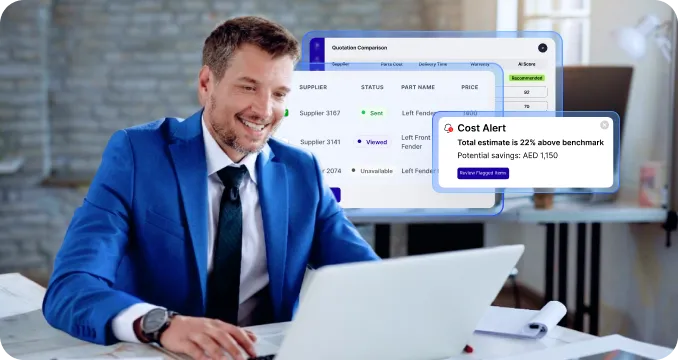
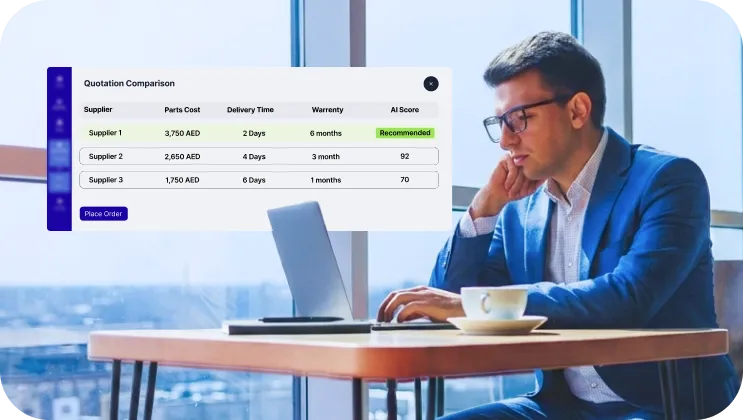
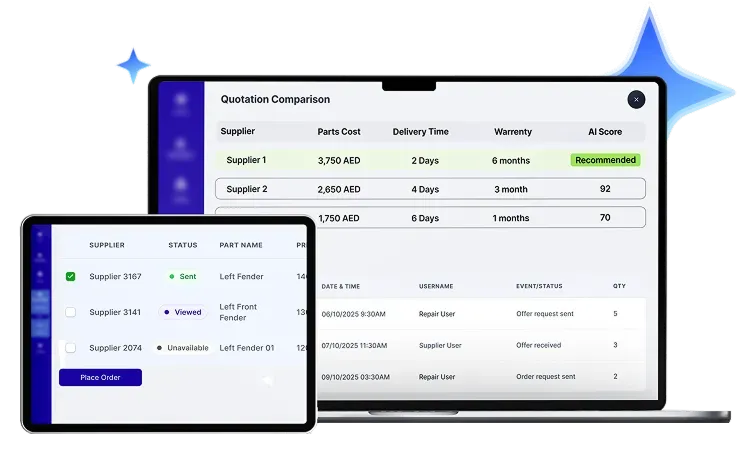
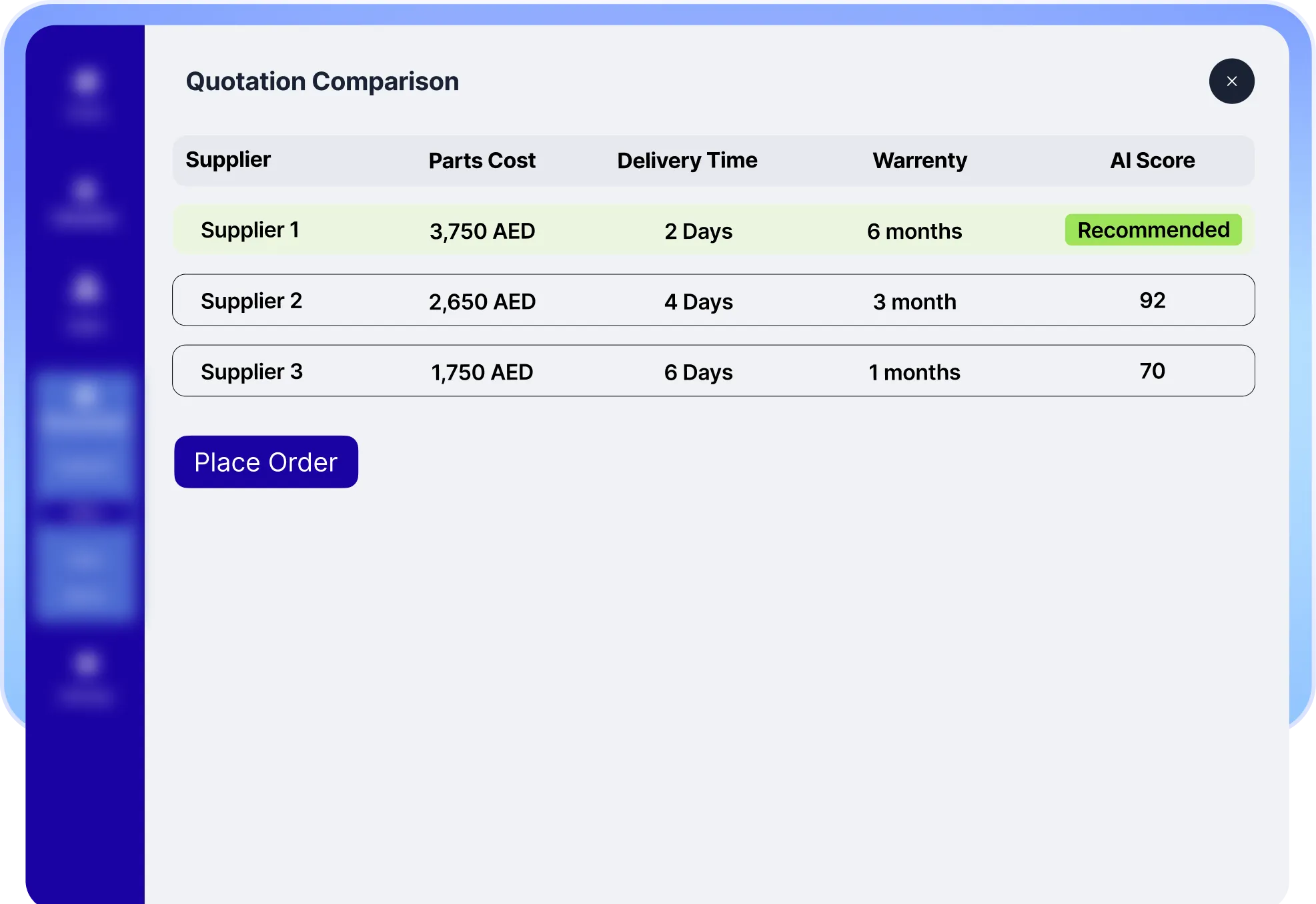
AI-Driven Mini-Tendering & Smart Quotation Comparison
Blue four-point star shape with the number 1 in white at the center.
AI-Driven Mini-Tendering & Smart Quotation Comparison

Launch structured mini-tenders to approved suppliers. Use AI to compare quotations based on price, availability, delivery timelines, historical performance, and claim urgency to ensure the best possible selection.

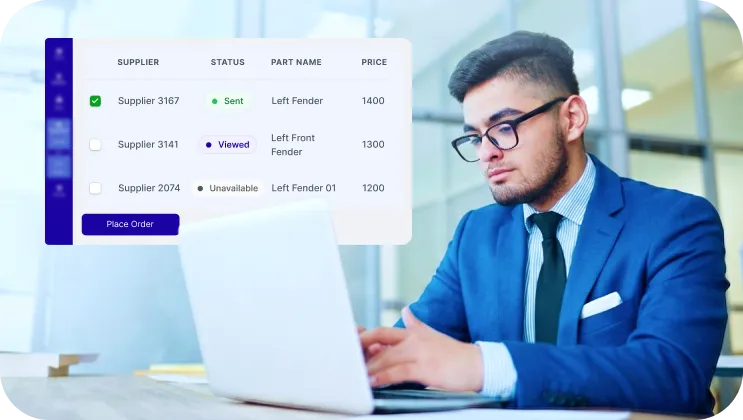
Anonymous Competitive Bidding for Fair Market Pricing

Ensure objective quotation evaluation by anonymizing supplier identities during comparison. Encourage competitive commercial offers that promote fair pricing, transparency, and stronger procurement integrity.

Anonymous Competitive Bidding for Fair Market Pricing
Blue four-pointed star icon with the number two in white at the center.
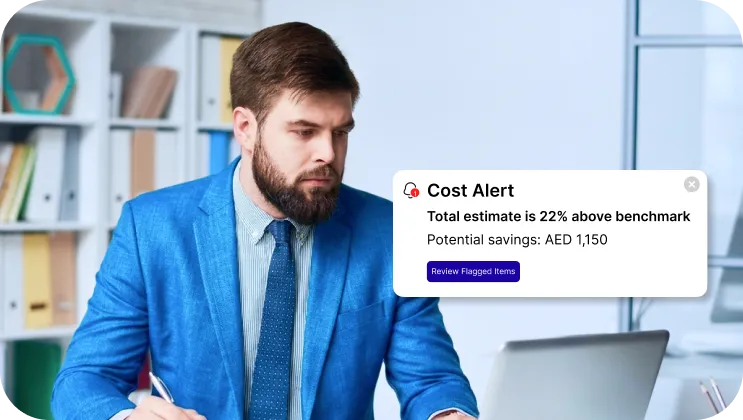
Revenue Protection Through Cost Optimization
Blue four-pointed star with a white number three in the center.
Revenue Protection Through Cost Optimization

Detect pricing inconsistencies, flag sourcing inefficiencies, and highlight cost-saving opportunities with AI. Turn spare parts procurement into a controlled financial lever within motor claims operations.

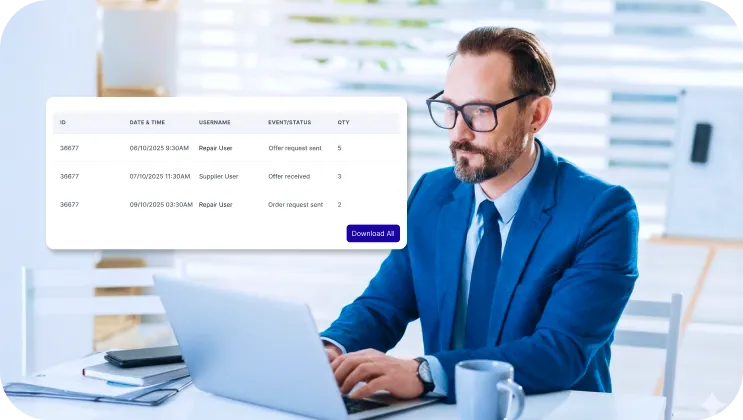
Full Audit Traceability & Regulatory Compliance

Capture every procurement action digitally, with time stamps, decision history, and supporting documentation. Maintain full traceability and compliance-ready records for internal audit, external regulators, and governance committees.
Full Audit Traceability & Regulatory Compliance
Blue four-point star with the number 4 in white at the center.
Blue four-pointed star icon with a glossy highlight effect.
key features
Blue four-pointed star icon with a glossy highlight effect.
Blue four-point star sparkle icon.

Key features of Addenda Vision

Smart Photo Inspection

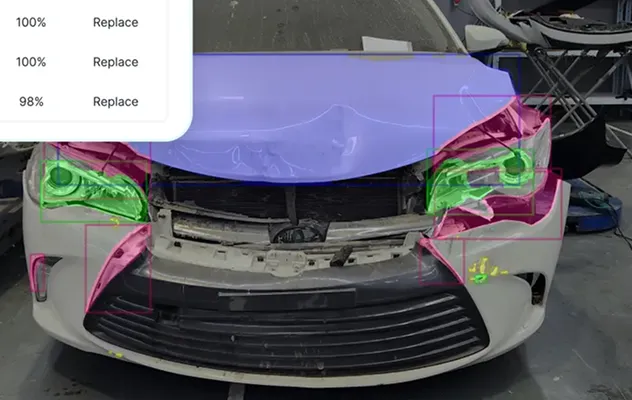
Upload or capture vehicle photos and let AI detect visible damage instantly. Identify dents, scratches, cracks, and disjoints within seconds.

Front of a white car with visible damage and colored overlays highlighting the headlights, hood, and bumper parts.
Damage Segmentation and Visual Mapping

Segment detected damage areas and highlight them using color-coded overlays directly on the vehicle image. See where the damage is, distinguish affected zones easily, and keep reporting consistent across every inspection.

Front of a white car with visible damage and colored overlays highlighting the headlights, hood, and bumper parts.
Intelligent Repair Recommendations

Evaluate detected damage and let AI recommends whether affected parts should be repaired or replaced. Support standardized repair decisions and improve estimate accuracy.

Front of a white car with visible damage and colored overlays highlighting the headlights, hood, and bumper parts.
Guided 360° Image Capture Grids

Provide structured on-screen capture guides to document the entire vehicle from every required angle. Ensure complete image coverage, reduce missing details and maintain consistent inspection quality every time.

Front of a white car with visible damage and colored overlays highlighting the headlights, hood, and bumper parts.
Automated Condition Reporting

Generate instant, structured vehicle condition reports after inspection, with damage details, parts impacted, and severity insights ready for sharing or archiving.

Front of a white car with visible damage and colored overlays highlighting the headlights, hood, and bumper parts.
Blue four-pointed star icon with a glossy highlight effect.
How we connect with system
Blue four-pointed star icon with a glossy highlight effect.

Integrates With

Black envelope icon with an email symbol on a white background.
Email
Black speech bubble icon with the text SMS inside.
SMS
WhatsApp logo in white on a black circular background.
WhatsApp
Blue four-pointed star icon with a glossy highlight effect.
Journey
Blue four-pointed star icon with a glossy highlight effect.

5 Steps to Generate a Repair Estimate

Once approved, the request is assigned to the appropriate garage, and the estimate is converted into a repair order.
White polygon shape composed of five connected lines forming an irregular pentagon on a black background.
Once approved, the request is assigned to the appropriate garage, and the estimate is converted into a repair order.
White polygon shape composed of five connected lines forming an irregular pentagon on a black background.
Once approved, the request is assigned to the appropriate garage, and the estimate is converted into a repair order.
White polygon shape composed of five connected lines forming an irregular pentagon on a black background.
Once approved, the request is assigned to the appropriate garage, and the estimate is converted into a repair order.
White polygon shape composed of five connected lines forming an irregular pentagon on a black background.
Once approved, the request is assigned to the appropriate garage, and the estimate is converted into a repair order.
White polygon shape composed of five connected lines forming an irregular pentagon on a black background.
Timeline with nine blue icons representing car maintenance steps including checklist, mobile inspection, cost estimation, customer approval, garage service, mechanic, repairs, remote diagnostics, and scheduled checkup.
Solid black triangle pointing upward on a white background.
Once approved, the request is assigned to the appropriate garage, and the estimate is converted into a repair order.
Solid black triangle pointing upward on a white background.
Once approved, the request is assigned to the appropriate garage, and the estimate is converted into a repair order.
Solid black triangle pointing upward on a white background.
Once approved, the request is assigned to the appropriate garage, and the estimate is converted into a repair order.
Solid black triangle pointing upward on a white background.
Once approved, the request is assigned to the appropriate garage, and the estimate is converted into a repair order.
Blue icon of a clipboard with car documents and a car in front of it.
Upload or Inspect

Start by uploading vehicle damage images or opening a new estimate manually inside the platform.

Smartphone with stars on screen next to a car representing taxi booking.
Create an Estimate

Select affected panels, add labor operations, choose parts, and apply pricing rules based on your workshop’s configuration.

Icon of a taxi car in front of a document with a dollar sign, symbolizing a taxi fare or bill.
Review & Adjust

Validate calculations, modify line items if needed, and ensure the estimate reflects the exact repair scope.

Blue line icons of two people, a gear representing settings, and a hand giving a thumbs-up.
Generate & Share

Generate a structured estimate document ready to send to customers, insurers, or internal approvers.

Blue line icons of two people, a gear representing settings, and a hand giving a thumbs-up.
Track & Update

Monitor estimate status, manage revisions, and keep a documented history of changes until final approval.

Blue four-pointed star icon with a glossy highlight effect.
industries
Blue four-pointed star icon with a glossy highlight effect.

Industries Addenda Repair Serves

Icon of a car with sparkles representing exterior auto detailing services.
Car Detailing Centers
Blue gear icon connected to three small squares representing fleet management or organizational structure.
Fleet Operations
Icon of an auto parts store with a car under a wrench sign on the roof.
Spare Parts Shops
Blue tire icon with tread pattern details.
Tire Outlets
Icon of a car with a wrench symbol, representing car repair or maintenance.
Bodyshops & Accident Repair Center
Blue line icon of a smartphone with a gear on the screen representing settings or configuration.
OEM Service Centers
Icon of a tow truck with a wrench above it, symbolizing truck repair services.
Truck Repair Centers
Icon of a person selling a car from a dealership desk next to a car.
Dealerships
Icon of a car parked inside a garage with a triangular roof and circular window.
Car Service & Maintenance Shops
Blue icon of a car with a shield featuring a checkmark above it, symbolizing vehicle protection or insurance.
Insurance Companies
Blue line icon of a car with a key above it indicating car rental or car key access.
Car Rental Companies
Icon of a storefront with a striped awning above and two people standing below, symbolizing a franchise business.
Multi branch Garage Networks
Blue four-pointed star icon with a glossy highlight effect.
comparison
Blue four-pointed star icon with a glossy highlight effect.

How Addenda FNOL Compared to Traditional FNOL Processes

Traditional FNOL Addenda FNOL
Availability Dependency on operating hours and call center availability. 24/7 digital FNOL submission, accessible anytime from anywhere.
Speed Back-and-forth communication to complete required information. Guided digital flow completed in minutes with required data captured upfront.
Transparency Updates are shared manually through calls or emails. Real-time claim tracking with automated status notifications.
Data Quality Free-text entries and inconsistent information across channels. Structured, validated data capture with mandatory fields.
Fraud & Control Manual verification after submission. Time-stamped, geo-tagged uploads with image source identification.
Blue four-pointed star icon with a glossy highlight effect.
packages
Blue four-pointed star icon with a glossy highlight effect.

our selection of plans to identify the ideal choice  for your enterprise.

Lite
Blue heart-shaped icon with a rounded design.Black checkmark inside a white circle with a black border.
Single site, up to 50 transactions p/m
Black circular close button with a white 'X' in the center.
Launch time B2C
Blue heart-shaped icon with a rounded design.Black checkmark inside a white circle with a black border.
1 User license
Black circular close button with a white 'X' in the center.
Technician calendar
Black circular close button with a white 'X' in the center.
Customer application (Auto builder)
Black circular close button with a white 'X' in the center.
AI vehicle inspection
Standard
Blue heart-shaped icon with a rounded design.Black checkmark inside a white circle with a black border.
Single Site, up to 100 transactions p/m
Blue heart-shaped icon with a rounded design.Black checkmark inside a white circle with a black border.
2 Weeks Launch time B2C
Blue heart-shaped icon with a rounded design.Black checkmark inside a white circle with a black border.
Up to 5 user licenses
Black circular close button with a white 'X' in the center.
Technician calendar
Blue heart-shaped icon with a rounded design.Black checkmark inside a white circle with a black border.
Customer application (Auto builder)
Blue heart-shaped icon with a rounded design.Black checkmark inside a white circle with a black border.
AI vehicle inspection
Professional
Blue heart-shaped icon with a rounded design.Black checkmark inside a white circle with a black border.
Single site, up to 250 transactions p/m
Blue heart-shaped icon with a rounded design.Black checkmark inside a white circle with a black border.
2 Weeks Launch time B2C
Blue heart-shaped icon with a rounded design.Black checkmark inside a white circle with a black border.
Up to 5 user licenses
Blue heart-shaped icon with a rounded design.Black checkmark inside a white circle with a black border.
Technician calendar
Blue heart-shaped icon with a rounded design.Black checkmark inside a white circle with a black border.
Customer application (Auto builder)
Blue heart-shaped icon with a rounded design.Black circular close button with a white 'X' in the center.
AI vehicle inspection
Premium
Blue heart-shaped icon with a rounded design.Black checkmark inside a white circle with a black border.
Multi site operators
Blue heart-shaped icon with a rounded design.Black checkmark inside a white circle with a black border.
TBA Launch time B2C
Blue heart-shaped icon with a rounded design.Black checkmark inside a white circle with a black border.
Up to 10 user licenses
Blue heart-shaped icon with a rounded design.Black checkmark inside a white circle with a black border.
Unlimited technician calendar
Blue heart-shaped icon with a rounded design.Black checkmark inside a white circle with a black border.
Customer application (Auto builder)
Blue heart-shaped icon with a rounded design.Black checkmark inside a white circle with a black border.
AI vehicle inspection
Blue four-pointed star icon with a glossy highlight effect.
testimonials
Blue four-pointed star icon with a glossy highlight effect.

what our clients say

Central user icon connected by circular lines to four surrounding user icons, symbolizing network or communication.
Five blue stars in a horizontal row.

Addenda brought structure and financial control to our spare parts sourcing. We now compare quotations objectively, reduce cost leakage, and accelerate approvals without adding operational complexity.

Motor Insurance Operations Director
Blue to white gradient background with a thick black quarter circle shape in the bottom left corner.
Five blue stars in a horizontal row.

With AI-driven comparison and full audit visibility, procurement is no longer reactive. We have measurable control over supplier performance and parts expenditure.

Procurement Manager
Blue to white gradient background with a thick black quarter circle shape in the bottom left corner.
Five blue stars in a horizontal row.

The digital tendering process is structured and fair. Requests are clear, timelines are defined, and competition is based on value and performance.

Spare Parts Supplier
Blue to white gradient background with a thick black quarter circle shape in the bottom left corner.
Blue four-pointed star icon with a glossy highlight effect.
FAQs
Blue four-pointed star icon with a glossy highlight effect.

Answers to Your Most Common Questions

1.
What is Addenda Parts Supplier Management?
Addenda is an AI-powered platform that digitizes spare parts procurement and supplier management. It connects insurers, workshops, and parts suppliers through structured workflows to ensure transparency, cost control, and faster repair turnaround times.
2.
Can suppliers see each other’s quotations?
No. Supplier identities are anonymized during the bidding and comparison process. This ensures fair, competitive pricing and objective evaluation.
3.
Does the platform support regulatory compliance?
Yes. Every procurement action is fully documented with timestamps, decision history, and supporting documents. This ensures audit traceability and compliance-ready records for internal and external review.
4.
How does the mini-tendering process work?
Insurance or workshop teams initiate a mini tender to a selected group of approved suppliers. AI then compares quotations based on price, delivery time, availability, and historical performance, recommending the optimal choice.
5.
Can Addenda help reduce procurement costs?
Absolutely. By detecting overpricing, sourcing inefficiencies, and cost-saving opportunities, Addenda turns spare parts procurement into a financial lever that protects revenue and reduces leakage.
6.
How quickly can suppliers and workshops get approvals?
The platform digitizes request approvals and tracks delivery in real time, significantly reducing turnaround times compared to traditional manual processes.
7.
Is Addenda suitable for small or medium-sized insurance companies?
Yes. The platform scales to organizations of all sizes, providing structured processes and AI-driven insights without adding operational complexity.
8.
How do I request a demo?
Simply click “Request a Demo” on our website and fill out the form. Our team will guide you through the platform and show how Addenda can transform your spare parts procurement.
1.
What technologies do you specialize in?
We work with React, Node.js, Python, Flutter, AWS, MongoDB, and more — covering web, mobile, cloud, and AI.
2.
What technologies do you specialize in?
We work with React, Node.js, Python, Flutter, AWS, MongoDB, and more — covering web, mobile, cloud, and AI.
3.
What technologies do you specialize in?
We work with React, Node.js, Python, Flutter, AWS, MongoDB, and more — covering web, mobile, cloud, and AI.
4.
What technologies do you specialize in?
We work with React, Node.js, Python, Flutter, AWS, MongoDB, and more — covering web, mobile, cloud, and AI.
1.
What technologies do you specialize in?
We work with React, Node.js, Python, Flutter, AWS, MongoDB, and more — covering web, mobile, cloud, and AI.
2.
What technologies do you specialize in?
We work with React, Node.js, Python, Flutter, AWS, MongoDB, and more — covering web, mobile, cloud, and AI.
3.
What technologies do you specialize in?
We work with React, Node.js, Python, Flutter, AWS, MongoDB, and more — covering web, mobile, cloud, and AI.
4.
What technologies do you specialize in?
We work with React, Node.js, Python, Flutter, AWS, MongoDB, and more — covering web, mobile, cloud, and AI.
1.
What technologies do you specialize in?
We work with React, Node.js, Python, Flutter, AWS, MongoDB, and more — covering web, mobile, cloud, and AI.
2.
What technologies do you specialize in?
We work with React, Node.js, Python, Flutter, AWS, MongoDB, and more — covering web, mobile, cloud, and AI.
3.
What technologies do you specialize in?
We work with React, Node.js, Python, Flutter, AWS, MongoDB, and more — covering web, mobile, cloud, and AI.
4.
What technologies do you specialize in?
We work with React, Node.js, Python, Flutter, AWS, MongoDB, and more — covering web, mobile, cloud, and AI.
1.
What technologies do you specialize in?
We work with React, Node.js, Python, Flutter, AWS, MongoDB, and more — covering web, mobile, cloud, and AI.
2.
What technologies do you specialize in?
We work with React, Node.js, Python, Flutter, AWS, MongoDB, and more — covering web, mobile, cloud, and AI.
3.
What technologies do you specialize in?
We work with React, Node.js, Python, Flutter, AWS, MongoDB, and more — covering web, mobile, cloud, and AI.
4.
What technologies do you specialize in?
We work with React, Node.js, Python, Flutter, AWS, MongoDB, and more — covering web, mobile, cloud, and AI.

Take Control of Spare Parts Procurement

Blue star-shaped sparkle icon with light rays.

Request a demo

Parts Management CTA
Illustration of a person wearing a hat and glasses facing a retro computer displaying code symbols and a profile image on the screen.
Ready to Digitize Your Business?

Book a personalized demo to explore how can Addenda help you digitize your operations.

Valid number
Terms & Conditions
Thank you for submitting a request for demo, Our team will reach out to you for scheduling demo at your convenient time
Oops! Something went wrong while submitting the form.
Blue three-pointed star with a gradient from light to darker blue.